I’d sum up the article like this: AI nutrition apps work by matching your photo, text, voice note, or barcode scan to food records, then pulling calories and nutrients from those records. For U.S. users, the biggest gap is data quality: USDA-based entries tend to be around 2% to 5% error, while crowdsourced entries can be 15% to 30% off. That gap matters more than app design.

Here’s what I’d want to know right away:

Can AI Make Nutrition Tracking Easier?

Quick Comparison

AppMain strengthMain tradeoffBest fit
WellingPhoto, chat, voice, and barcode logging with global food supportLess nutrient depth than CronometerPeople who want fast daily logging
MyFitnessPalLarge U.S. branded-food databaseMore user-added entry error riskPeople who log lots of packaged foods
CronometerDeep micronutrient detailSlower, more manual loggingPeople who want close nutrient tracking

So if I were comparing the best AI nutrition apps, I’d keep it simple: use one with verified food data, strong barcode support, and a good way to fix mixed meals. Then I’d still spot-check labels, USDA entries, and portion sizes before I trust the numbers.

What global food databases contain and why AI apps need them

Once AI figures out what a food is, the app still has one more job: it needs a database entry that turns that match into nutrition data.

That’s what a food composition database does. It stores lab-tested or label-based nutrient values for specific foods. After a food is identified, the app pulls from that database to assign calories, protein, fat, carbs, fiber, vitamins, and minerals to the item.

In calorie tracking, database quality matters more than interface quality. A slick app can still give bad numbers if the food data behind it is weak.

AI apps pull from a mix of sources:

Government databases like USDA FoodData Central tend to have the lowest error rates, at about 2–5%. Crowdsourced sources can climb to 15–30% error per item. Curated databases such as NCCDB, which powers micronutrient tracking in Cronometer, go much deeper into nutrient detail, tracking 84 or more nutrients per food.

Generic foods, branded products, and restaurant meals

Not all database entries are built the same. Some are far more dependable than others.

There are three main types: generic foods, branded products, and restaurant meals.

Generic foods, like apple, brown rice, or ground beef, usually come from government sources such as USDA FoodData Central. These entries tend to be the most dependable, with error rates around 2–4%.

Branded products are tied to UPC or EAN barcodes and usually come from manufacturer submissions or commercial feeds. Their accuracy is often around 5–10%. One catch: U.S. nutrition label rules allow a ±20% tolerance on packaged nutrition values. So even when a barcode match is correct, the label itself may still have some wiggle room.

Restaurant meals are the weakest category. Chain restaurant data often comes from company nutrition PDFs. Independent restaurants are tougher, since apps may rely on AI-scraped menus or user-reported portions, and those can be off by 10–25%. Restaurant entries also tend to miss the little extras that change the math fast — oils, butter, and sauces.

Those entry types shape how apps match foods, update records, and fix mistakes in real time.

Global coverage and where the gaps are

Most major nutrition apps were built around Western eating habits. That creates plain accuracy problems for people eating foods like pho, dal, or injera.

A 2021 study found that logging errors averaged 12% for Western foods. But the numbers jumped to 23% for East Asian dishes, 28% for South Asian dishes, and 34% for African dishes. South Asian adults using apps built around Western diets under-reported daily intake by an average of 18%, and that climbed to 28% on days with home-cooked meals.

Coverage gaps are widest for traditional and home-cooked dishes from non-Western cuisines.

Specialty databases such as NIN India, AFROFOODS, and KNU-FoodBase help fill some of those gaps. The best AI weight loss apps are also training on more globally varied datasets to get better at foods from Levantine, West African, and South Indian cuisines.

Even so, many entries are still missing. Apps like Welling lean on broader global coverage to get better photo, chat, and barcode matches across cuisines.

That’s where the next problem shows up: keeping data clean, current, and synced across sources and regions.

How AI connects to global food databases and keeps them up to date

After a food is identified, the app pulls the matching nutrition record and keeps that record in sync.

APIs, syncing, and food lookup

Once the app figures out what the food is, it has to match that item to live database records. To do that, apps call multiple databases through APIs. Generic foods are usually matched by name, while packaged foods are matched by barcode.

These databases update in the background on different schedules. Anchor databases usually re-sync on quarterly or annual release cycles. Branded product data moves faster and can reflect label changes within about 14 days of a manufacturer update.

Before any of that data shows up for the user, the app still has one more job: fix bad matches and messy records.

How AI cleans up messy food data

Food data can be all over the place. One database might say “chickpeas”, another might say “garbanzo beans”, and a third might list a regional name. AI helps smooth that out by standardizing units, merging duplicate entries, and mapping regional names across databases with systems like LanguaL and FoodEx2.

Data quality also varies a lot by source. Verified, government-anchored databases usually have error rates of 2% to 5%. Crowdsourced databases can hit 15% to 30% per item.

Key global food data sources for AI nutrition apps

The main sources vary by coverage, nutrient detail, and how fast they update.

SourceScopeCountry CoverageNutrient DepthUpdate FrequencyCommon Use Cases
USDA FoodData Central~400,000 itemsUnited StatesHigh (lab-analyzed)Annual/ongoingNorth American apps, research
Open Food Facts~3,000,000 itemsGlobalVariable (crowdsourced)Real-time (user-driven)Packaged food, Nutri-Score
GS1 GDSNMillions of SKUsGlobalHigh (manufacturer)Near real-timeRetailers, high-end apps
LabelInsight/Nielsen1–2 million SKUsPrimarily US/UKHigh (verified)Regular feedsEnterprise-grade apps

Apps mix these sources in different ways. Welling, for example, combines them to help keep results current.

How apps like Welling use global databases for photo, chat, and barcode logging
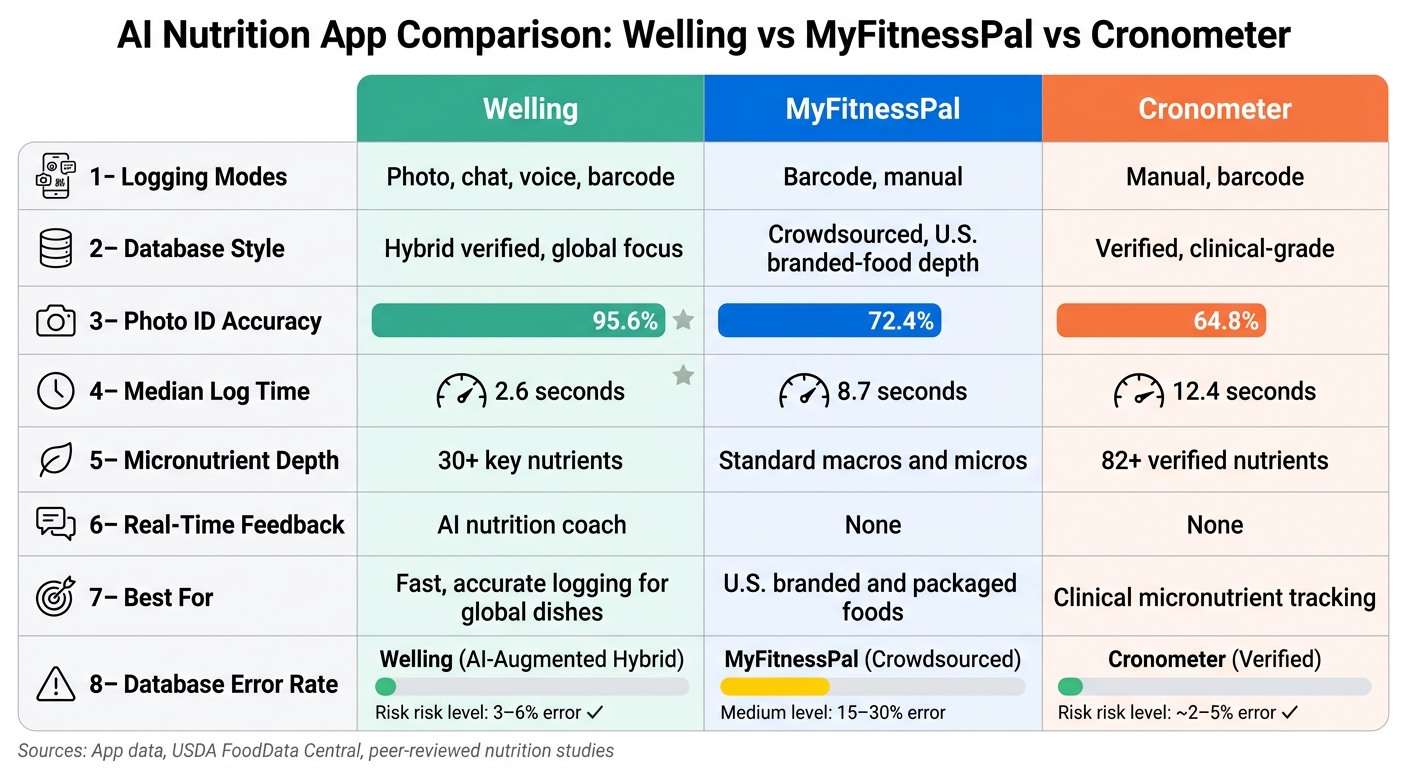
AI Nutrition App Comparison: Welling vs MyFitnessPal vs Cronometer

You see that database setup at work in everyday food logging — especially with photos, chat, and barcodes.

When you snap a photo of your plate, the app first figures out what foods are there, splits the meal into separate items, and estimates portion size. But that’s only the first part. After the image model does its job, the database fills in the nutrition facts. That handoff matters a lot. Portion error lands around ±0.9% to ±1.2%, compared with ±17% to ±35% for 2D methods.

How Welling handles fast, personalized tracking

Welling puts photo, chat, voice, and barcode logging into one flow. You can type a meal, say it out loud, scan a barcode, or take a photo, and the AI converts that input into structured calories and macros. Average logging time is 2.6 seconds, and barcode scans can finish in as little as 1.4 seconds.

That setup helps a lot for U.S. users who don’t eat the same kind of meals every day. Maybe breakfast is oatmeal at home, lunch is a packaged snack, and dinner is Korean, Mexican, or Indian takeout. Welling’s training dataset covers 4.2 million photos across 60 countries, which gives it a better shot at handling non-U.S. meals that often throw off U.S.-focused apps. It also runs on-device, so it still works without Wi-Fi. Over time, user-specific learning picks up patterns like your usual coffee mug size or your oat-to-yogurt ratio, which helps the app get more accurate the more you use it.

How Welling compares to MyFitnessPal, Cronometer, and Yazio

The database behind each app also shapes how fast it feels, how often it gets foods right, and how much nutrient detail it gives you.

MyFitnessPal has the deepest U.S. branded-food database, built over 15 years of user contributions. The upside is depth for packaged foods sold in the United States. The downside is that crowdsourced entries can bring the usual 15% to 30% per-item error risk tied to user-generated data. Cronometer stands out for clinical-style micronutrient detail, with 82+ verified nutrients, but it’s built more for precision than speed.

FeatureWellingMyFitnessPalCronometer
Logging modesPhoto, chat, voice, barcodeBarcode, manualManual, barcode
Database styleHybrid verified, global focusCrowdsourced, U.S. branded-food depthVerified, clinical-grade
Photo ID accuracy95.6%72.4%64.8%
Median log time2.6 seconds8.7 seconds12.4 seconds
Micronutrient depth30+ key nutrientsStandard macros and micros82+ verified nutrients
Real-time feedbackAI nutrition coachNoneNone
Best forFast, accurate logging for global dishesU.S. branded and packaged foodsClinical micronutrient tracking

That’s the main split between these apps: Welling leans toward fast logging across many cuisines, Cronometer leans toward deeper micronutrient tracking, and MyFitnessPal is strongest with U.S. packaged foods.

How to use AI nutrition apps accurately in the U.S.

Global databases are only part of the story. An app can have a huge food library and still log the wrong item if it picks the wrong match. Syncing in real time helps, but you still need to check the entry before you trust it.

How to check if a food entry is accurate

Start with the fastest reality check: compare the app’s entry with the Nutrition Facts panel on the package. For basic foods like rice, eggs, oats, or chicken, cross-check with USDA FoodData Central. That gives you a stronger baseline.

That said, labels still have a ±20% tolerance, so think of them as a quick check, not perfect truth.

Verified government databases set a higher accuracy ceiling than crowdsourced ones.

Before you save anything, check the serving unit the app assumed. Was it using cups, tablespoons, ounces, or grams? That’s where a lot of logging mistakes start.

For packaged foods, barcode scans cut down on guesswork because they match the UPC to label data. For bowls, casseroles, and other dense foods, use a 45-degree photo in good light. That angle tends to give the app a better shot at reading portion size.

If the app still gets the meal wrong, don’t force a bad match. Use chat or the recipe builder instead.

How to log mixed dishes, custom recipes, and missing foods

Mixed dishes are where things get messy. Chili, pasta, stir-fry, burrito bowls — these are the meals databases almost never nail perfectly on the first try.

With photo logging, use chat to add what the camera can’t see, like oil, butter, dressings, or sauces. Those “small” extras can change the numbers fast. Manually fixing the AI’s portion estimate after logging has been shown to cut total calorie error by more than half.

For homemade meals, the recipe builder is usually the safer move. Add ingredients yourself so the app isn’t guessing from a photo alone.

A simple rule of thumb:

That extra detail can make the log much closer to what was actually on the plate.

How to weigh database coverage, accuracy, and privacy

Choosing the best food calorie app depends heavily on the database behind it, no matter how careful you are. If the source is weak, the output can be off from the start.

Database TypeAccuracyUpdate SpeedTransparencyBest For
Verified (USDA)2–4% errorAnnual/BiennialHighGeneric ingredients, U.S. staples
Crowdsourced (MyFitnessPal)15–30% errorReal-time, user-drivenLowQuick logging, obscure brands
AI-Augmented Hybrid (Welling)3–6% errorQuarterly / 14-day for brandsModerate, with reviewDaily tracking, mixed meals

Photo-based apps need one more check: privacy. The more an app depends on images, the more its storage policy matters. Accuracy is one part of the decision. Data handling is the other part.

Look at:

Welling’s on-device privacy mode keeps photos local on supported iOS devices.

What global food databases make possible for AI nutrition tracking

Global databases make photo, chat, and barcode logging usable at scale. Put simply, they help these tools work in day-to-day life instead of falling apart the moment someone scans a packaged snack or logs a home-style meal.

Verified databases set the ceiling for accuracy. Crowdsourced entries bring more room for mistakes. And that trade-off matters. Accuracy counts, but freshness counts too.

Real-time syncing keeps branded foods current within 14 days of label changes and refreshes authoritative sources on a regular release cycle.

For U.S. users, the rule is simple: pick an app with verified data, then spot-check the serving size and unit before saving.

That’s the balance Welling is built to deliver. Welling combines a global food database, photo/chat logging, and adaptive coaching to handle non-Western meals that many apps still misread. It costs $9.99/month or $79/year, below MyFitnessPal Premium at $19.99/month.

Frequently asked questions

How do food databases affect nutrition accuracy?
Food databases have a direct impact on nutrition accuracy because tracking apps depend on them for calorie and macronutrient data. So even if AI identifies a food correctly, the nutrition numbers are only as good as the database entry behind it. Databases built on lab analysis are usually more precise. Crowdsourced databases, on the other hand, can bring in errors through duplicate listings, wrong portion sizes, and unverified entries. Welling improves accuracy by using a verified global food database that includes regional and international dishes.
Why are restaurant and mixed-meal logs less reliable?
Restaurant and mixed-meal logs tend to be less reliable. The main issue is simple: these meals often hide ingredients like oils, butter, or sugar, and cooking methods can vary a lot from one kitchen to another. On top of that, photos make it tough to judge ingredient amounts in complex dishes. Some apps add even more error by relying on crowdsourced databases filled with duplicates or incorrect portion sizes. Welling cuts down on those problems by pairing photo logging with chat-based clarification and a verified global food database.
What should I verify before saving a food entry?
Before saving, check the portion size. A photo can fool AI when it tries to judge depth or volume. For packaged foods, use a barcode scanner. For mixed dishes, writing out the meal in plain language can work better than photo recognition alone. If your app uses crowdsourced data, double-check entries against a trusted source like the USDA database. Also, take photos from directly above and in good lighting.

Related guides on this site

Best Calorie Tracking Apps 2026
11-app benchmark with per-niche winners.
AI vs Traditional Trackers
Speed, accuracy, adherence, and pricing compared.
Mixed-Ingredient Meals
How AI apps handle 5+ ingredient dishes.
2026 Benchmark Methodology
How the 15,000-photo test works.